Light Effects Guide
The Light Effects Framework provides a comprehensive system for creating and managing visual effects on LIFX devices. This guide covers all software effects and common patterns for using the effects system.
Overview
The effects framework consists of three main components:
- Conductor: Central orchestrator that manages effect lifecycle and state
- Effects: Pre-built effect classes (Pulse, ColorLoop, Rainbow, Flicker, Aurora, Progress, Sunrise/Sunset) and base class for custom effects
- Effect Registry: Central discovery mechanism for querying available effects by device type
- State Management: Automatic capture and restoration of device state before and after effects
Migrating from an older version?
See Effect API Changes for breaking changes and migration steps.
Basic Usage
Your First Pulse Effect
The simplest way to use the effects framework is with the EffectPulse class:
import asyncio
from lifx import discover, DeviceGroup
from lifx.effects import Conductor, EffectPulse

async def main():
    # Discover lights on your network
    devices = []
    async for device in discover():
        devices.append(device)
    group = DeviceGroup(devices)

    if not group.lights:
        print("No lights found")
        return

    # Create a conductor to manage effects
    conductor = Conductor()

    # Create a blink effect
    effect = EffectPulse(mode='blink', cycles=5)

    # Start the effect on all lights
    await conductor.start(effect, group.lights)

    # Wait for effect to complete (5 cycles * 1 second)
    await asyncio.sleep(6)

    print("Effect complete - lights restored to original state")

asyncio.run(main())
Your First ColorLoop Effect
The EffectColorloop creates a continuous rainbow effect:
import asyncio
from lifx import discover, DeviceGroup
from lifx.effects import Conductor, EffectColorloop

async def main():
    devices = []
    async for device in discover():
        devices.append(device)
    group = DeviceGroup(devices)

    if not group.lights:
        print("No lights found")
        return

    conductor = Conductor()

    # Create a rainbow effect
    effect = EffectColorloop(
        period=30,      # 30 seconds per full cycle
        change=20,      # Change hue by 20 degrees each step
        spread=60       # Spread colors across devices
    )

    # Start the effect
    await conductor.start(effect, group.lights)

    # Let it run for 2 minutes
    await asyncio.sleep(120)

    # Stop and restore lights to original state
    await conductor.stop(group.lights)

asyncio.run(main())
Each step lasts period * change / 360 seconds: 1.67 seconds in the example above. A colour
loop writes each light once per step, with the step as the transition, and the light fades
between steps itself. With the defaults that is one packet every 3.3 seconds per light, far less
traffic than an effect that draws frames, so a colour loop runs on Thread lights without
enable_thread. change must be more than 0 and less than 180, because the firmware fades hue
the short way round the colour wheel.
On one light component of a Ceiling or Mirror, a colour loop writes the same way while it has the light to itself. The two light components share one tile. While another effect draws on the other light component, that effect's frames carry the colour loop's colour, and the colour loop sends nothing itself. While a fade you asked of the other light component runs, the colour loop draws frames so the fade shows. On a Thread light it goes on writing once per step, and each write carries the other light component as far through its fade as it will be when the step ends, so the firmware follows that fade a step at a time.
Rainbow Effect
The EffectRainbow spreads a full 360-degree rainbow across device pixels and scrolls it over time. Best on multizone strips and matrix lights:
import asyncio
from lifx import discover, DeviceGroup
from lifx.effects import Conductor, EffectRainbow

async def main():
    devices = []
    async for device in discover():
        devices.append(device)
    group = DeviceGroup(devices)

    if not group.lights:
        print("No lights found")
        return

    conductor = Conductor()

    # Rainbow that scrolls every 10 seconds
    effect = EffectRainbow(period=10, brightness=0.8)
    await conductor.start(effect, group.lights)

    await asyncio.sleep(30)
    await conductor.stop(group.lights)

asyncio.run(main())
On a Mirror ring
The rainbow closes on itself round a Mirror ring: the pixel before the ring origin (top centre by default) is one step of hue short of it, so there is no seam and it keeps circulating.
Flicker Effect
The EffectFlicker creates a warm fire/candle flicker using layered sine waves. On matrix devices, bottom rows glow hotter:
Renamed from EffectFlame
This software effect was renamed from EffectFlame to EffectFlicker because "Flame" is
the name of the firmware effect that matrix lights run themselves. EffectFlame remains
as a deprecated alias, emitting a DeprecationWarning, until the next major version.
from lifx.effects import EffectFlicker

# Default candle flicker
effect = EffectFlicker()
await conductor.start(effect, lights)

# Intense fast fire with wide temperature range
effect = EffectFlicker(intensity=1.0, speed=2.0, brightness=1.0)
await conductor.start(effect, lights)

await asyncio.sleep(30)
await conductor.stop(lights)
On a Mirror ring
Each flicker wave holds a whole number of cycles round a Mirror ring, so the ring origin (top centre by default) flickers in step with zone 24 and there is no seam.
Aurora Effect
The EffectAurora simulates northern lights with flowing colored bands. Best on multizone strips and matrix lights:
from lifx.effects import EffectAurora

# Default aurora (green/cyan/blue/purple)
effect = EffectAurora()
await conductor.start(effect, lights)

# Custom warm palette
effect = EffectAurora(palette=[280, 300, 320, 340], brightness=0.6)
await conductor.start(effect, lights)

await asyncio.sleep(60)
await conductor.stop(lights)
On a Mirror ring
The brightness bands hold two whole cycles round a Mirror ring instead of one and a half, so the bands meet at the ring origin (top centre by default) with no seam. Strips and matrix lights keep the original pattern.
Progress Bar Effect
The EffectProgress creates an animated progress bar on multizone lights (strips/beams) and on a Mirror. The filled region has a traveling bright spot, and you update the position at any time. On a Mirror, whole or either ring alone, progress keeps a seam at the ring origin (top centre by default): the bar fills from the ring origin exactly as it does on a strip.
from lifx.effects import EffectProgress

effect = EffectProgress(end_value=100)
await conductor.start(effect, [strip_light])

# Update progress from your application logic
for i in range(0, 101, 10):
    effect.position = float(i)
    await asyncio.sleep(2)

await conductor.stop([strip_light])
Sunrise and Sunset Effects
EffectSunrise and EffectSunset are duration-based effects for matrix devices (tiles, candles, Ceiling lights) that simulate natural light transitions:
from lifx.effects import EffectSunrise, EffectSunset

# 30-minute sunrise from bottom edge (rectangular tiles)
effect = EffectSunrise(duration=1800, brightness=1.0)
await conductor.start(effect, [matrix_light])

# Sunrise from center (round/oval Ceiling lights)
effect = EffectSunrise(duration=1800, brightness=1.0, origin="center")
await conductor.start(effect, [ceiling_light])

# Sunset that powers off when done
effect = EffectSunset(duration=1800, power_off=True)
await conductor.start(effect, [matrix_light])
Sunrise and sunset effects complete automatically after their duration — no need to call conductor.stop(). Sunrise leaves the light at full daylight. Sunset can optionally power off the light.
Key Concepts
Conductor
The Conductor is the central orchestrator that:
- Captures device state before effects run
- Powers on devices if needed
- Executes effects
- Restores devices to original state when done
You typically create one conductor instance and reuse it for multiple effects.
Effect State Management
The effects framework automatically:
- Captures current state (power, color, zones) before effect starts
- Powers on devices if they're off (configurable)
- Executes the effect
- Restores all devices to their pre-effect state
This happens completely automatically - you don't need to manage state yourself.
Lights on Thread
A software effect that draws frames, such as Rainbow or Flicker, streams them to every light it
runs on, and a Thread mesh is not built for that traffic. light.start_effect(), a light
component's start_effect(), conductor.start() and conductor.add_lights() refuse a light
evidenced as Thread with LifxUnsupportedCommandError, unless you pass enable_thread=True:
One Thread light refuses the whole start: nothing is captured, powered on or changed on any
light. The evidence is the light's own replies, or an mDNS record that says Thread; a light the
library has not heard from yet is not refused. EffectPulse sends waveforms rather than frames and
EffectColorloop writes each light once per step, so neither is refused, and nor are firmware
effects started with set_effect().
Effect Completion
Effects complete in different ways:
- Cycle-based — Pulse effects complete after their configured cycles finish
- Duration-based — Sunrise and sunset effects complete after their duration expires
- Manual: continuous effects (ColorLoop, Rainbow, Flicker, Aurora, Progress) run until
conductor.stop()is called
Common Patterns
Using Specific Lights
You can apply effects to specific lights instead of all discovered devices:
from lifx import discover, DeviceGroup

devices = []
async for device in discover():
    devices.append(device)
group = DeviceGroup(devices)

conductor = Conductor()

# Get lights by label
bedroom_lights = [
    light for light in group.lights
    if "Bedroom" in await light.get_label()
]

# Apply effect only to bedroom lights
effect = EffectPulse(mode='breathe', cycles=3)
await conductor.start(effect, bedroom_lights)
await asyncio.sleep(4)
Sequential Effects
You can run multiple effects one after another:
conductor = Conductor()

# First effect: blink
effect1 = EffectPulse(mode='blink', cycles=3)
await conductor.start(effect1, group.lights)
await asyncio.sleep(4)

# Second effect: breathe
effect2 = EffectPulse(mode='breathe', cycles=2)
await conductor.start(effect2, group.lights)
await asyncio.sleep(5)
Note: The conductor automatically restores state between effects, so each effect starts with the original device state.
Concurrent Effects on Different Devices
You can run different effects on different groups of lights simultaneously:
conductor = Conductor()

# Split lights into two groups
group1 = group.lights[:len(group.lights)//2]
group2 = group.lights[len(group.lights)//2:]

# Start both effects concurrently
effect1 = EffectPulse(mode='blink')
effect2 = EffectColorloop(period=20)

await conductor.start(effect1, group1)
await conductor.start(effect2, group2)

# Let them run
await asyncio.sleep(30)

# Stop all
await conductor.stop(group.lights)
Custom Colors
Both pulse and colorloop effects support custom colors:
from lifx import HSBK

# Create custom color
red = HSBK.from_rgb(1.0, 0.0, 0.0)
blue = HSBK.from_rgb(0.0, 0.0, 1.0)

# Pulse with custom color
effect = EffectPulse(mode='breathe', cycles=5, color=red)
await conductor.start(effect, group.lights)
await asyncio.sleep(6)
Checking Running Effects
You can check what effect is currently running on a device:
conductor = Conductor()
effect = EffectColorloop(period=30)
await conductor.start(effect, group.lights)

# Check what's running
for light in group.lights:
    current = conductor.effect(light)
    if current:
        print(f"{light.label}: {type(current).__name__}")
    else:
        print(f"{light.label}: idle")
Effect Registry
The EffectRegistry lets you discover available effects and filter by device type — useful for building UIs or integrations like Home Assistant:
from lifx import get_effect_registry, DeviceType

registry = get_effect_registry()

# List all software effects
for info in registry.effects:
    print(f"{info.name}: {info.description}")

# Get effects recommended for multizone strips
for info, support in registry.get_effects_for_device_type(DeviceType.MULTIZONE):
    print(f"{info.name} ({support.value})")

# Filter by actual device instance
for info, support in registry.get_effects_for_device(my_light):
    print(f"{info.name}: {support.value}")

# A Mirror classifies as DeviceType.MIRROR, and so does each of its rings
for info, support in registry.get_effects_for_device(my_mirror.front):
    print(f"{info.name}: {support.value}")
A Mirror ring is a 25-pixel line that wraps, so it has its own DeviceType.MIRROR rather than counting as a matrix. A light component only takes part in effects that draw frames, so effects such as pulse are left out for one. A Ceiling downlight classifies as a matrix, and a Ceiling uplight as a single light without embers and plasma.
Dynamic Light Management
You can add or remove lights from a running effect without restarting it:
# Start effect on initial lights
effect = EffectRainbow(period=10)
await conductor.start(effect, [light1, light2])

# Later, add a new light to the running effect
await conductor.add_lights(effect, [light3])

# Remove a light (restores its state by default)
await conductor.remove_lights([light2])

# Remove without restoring state
await conductor.remove_lights([light1], restore_state=False)
Monitoring Frame Data
For frame-based effects, you can read the most recent HSBK values sent to a device:
colors = conductor.get_last_frame(light)
if colors:
    avg_brightness = sum(c.brightness for c in colors) / len(colors)
    print(f"Average brightness: {avg_brightness:.1%}")
Best Practices
1. Use a Single Conductor
Create one conductor instance and reuse it throughout your application:
# Good
conductor = Conductor()
await conductor.start(effect1, lights)
await conductor.start(effect2, lights)

# Not recommended - creates unnecessary overhead
conductor1 = Conductor()
await conductor1.start(effect1, lights)
conductor2 = Conductor()
await conductor2.start(effect2, lights)
2. Always Wait for Completion
For pulse effects, wait for the effect duration before starting another:
effect = EffectPulse(mode='blink', period=1.0, cycles=5)
await conductor.start(effect, lights)
# Wait for effect to complete
await asyncio.sleep(5 * 1.0 + 0.5)  # cycles * period + buffer
3. Stop ColorLoop Effects Explicitly
ColorLoop effects run indefinitely, so always call conductor.stop():
effect = EffectColorloop(period=30)
await conductor.start(effect, lights)
await asyncio.sleep(60)
# Must explicitly stop
await conductor.stop(lights)
4. Handle Discovery Failures
Always check if lights were found before attempting effects:
from lifx import discover, DeviceGroup

devices = []
async for device in discover():
    devices.append(device)
group = DeviceGroup(devices)

if not group.lights:
    print("No lights found on network")
    return

# Safe to use effects
conductor = Conductor()
# ...
5. Use DeviceGroup for Organization
The DeviceGroup provides convenient access to device collections:
from lifx import discover, DeviceGroup

# Discover devices
devices = []
async for device in discover():
    devices.append(device)
group = DeviceGroup(devices)

conductor = Conductor()
await conductor.start(effect, group.lights)
Complete Examples
Notification Effect
Use effects to create a notification system:
async def notify(lights: list, level: str = 'info'):
    """Flash lights to indicate a notification."""
    conductor = Conductor()

    if level == 'info':
        # Blue breathe
        color = HSBK.from_rgb(0.0, 0.0, 1.0)
        effect = EffectPulse(mode='breathe', cycles=2, color=color)
    elif level == 'warning':
        # Orange blink
        color = HSBK.from_rgb(1.0, 0.65, 0.0)
        effect = EffectPulse(mode='blink', cycles=3, color=color)
    elif level == 'error':
        # Red strobe
        color = HSBK.from_rgb(1.0, 0.0, 0.0)
        effect = EffectPulse(mode='strobe', cycles=10, color=color)

    await conductor.start(effect, lights)
    await asyncio.sleep(4)  # Wait for completion

# Usage
from lifx import discover, DeviceGroup

devices = []
async for device in discover():
    devices.append(device)
group = DeviceGroup(devices)

await notify(group.lights, level='warning')
Party Mode
Cycle through different effects:
async def party_mode(lights: list, duration: int = 60):
    """Run various effects for a party."""
    conductor = Conductor()
    end_time = asyncio.get_event_loop().time() + duration

    effects = [
        EffectColorloop(period=20, change=30, spread=60),
        EffectPulse(mode='strobe', cycles=20),
        EffectColorloop(period=15, change=45, brightness=0.8),
    ]

    effect_idx = 0
    while asyncio.get_event_loop().time() < end_time:
        effect = effects[effect_idx % len(effects)]

        if isinstance(effect, EffectColorloop):
            await conductor.start(effect, lights)
            await asyncio.sleep(20)
            await conductor.stop(lights)
        else:
            await conductor.start(effect, lights)
            await asyncio.sleep(3)

        effect_idx += 1

    # Ensure everything is stopped and restored
    await conductor.stop(lights)

# Usage
from lifx import discover, DeviceGroup

devices = []
async for device in discover():
    devices.append(device)
group = DeviceGroup(devices)

await party_mode(group.lights, duration=120)
More Effects
In addition to the effects above, lifx-async includes 18 effects adapted from pkivolowitz/lifx by Perry Kivolowitz. They use the same Conductor and FrameEffect infrastructure and run indefinitely until stopped.
Cylon

Larson scanner — a bright eye sweeps back and forth with a fading trail. Classic Knight Rider look.
from lifx.effects import EffectCylon

# Default scanner
effect = EffectCylon()
await conductor.start(effect, lights)

# Faster red scanner with wider eye
effect = EffectCylon(speed=1.0, width=5, hue=0, trail=0.7)
await conductor.start(effect, lights)

await asyncio.sleep(30)
await conductor.stop(lights)
Key parameters: speed (seconds per sweep), width (eye width in bulbs), hue, trail (decay factor 0-1)
On a Mirror ring
The eye bounces between the ring origin (top centre by default) and the ring's last pixel exactly as on a strip, keeping a seam at the ring origin.
Wave

Standing wave — zones vibrate between two colors with stationary nodes. Adjacent segments swing in opposite directions.
from lifx.effects import EffectWave

# Two-node standing wave
effect = EffectWave(nodes=2, hue1=0, hue2=240)
await conductor.start(effect, lights)

# Drifting wave (not purely standing)
effect = EffectWave(nodes=3, drift=10.0, speed=6.0)
await conductor.start(effect, lights)
Key parameters: speed (oscillation period), nodes (stationary points), hue1/hue2, drift (spatial drift degrees/s)
On a Mirror ring
A standing wave on a ring has an even number of nodes, so an odd nodes is raised by one and the
zones are spaced evenly round the ring. The wave has no seam at the ring origin (top centre by default).
Sine

Smooth ease-wave — bright humps roll along the strip using cubic smoothstep. Optional two-color gradient.
from lifx.effects import EffectSine

# Blue wave
effect = EffectSine(hue=200, wavelength=0.5, speed=4.0)
await conductor.start(effect, lights)

# Two-color gradient wave
effect = EffectSine(hue=0, hue2=240, wavelength=0.3)
await conductor.start(effect, lights)
Key parameters: speed, wavelength (fraction of strip), hue, hue2 (optional gradient), floor (min brightness)
On a Mirror ring
The wave holds a whole number of cycles round the ring (the nearest to 1 / wavelength, at least one), so
the humps roll on past the ring origin (top centre by default) with no seam. A hue2 gradient runs out from the ring origin and back, so it closes too.
Spectrum Sweep

Three sine waves 120° out of phase sweep through zones like a spectrum analyzer. Red, green, and blue channels blend via Oklab interpolation.
from lifx.effects import EffectSpectrumSweep

effect = EffectSpectrumSweep(speed=6.0, waves=1.0)
await conductor.start(effect, lights)
Key parameters: speed (sweep period), waves (number of wave periods across strip)
On a Mirror ring
waves is rounded to a whole number (at least one) and the zones are spaced evenly round the ring, so the
spectrum closes on itself with no seam.
Spin

Rotates theme colors through zones with smooth Oklab interpolation and per-zone hue shimmer.
from lifx.effects import EffectSpin

# Default spin with built-in theme
effect = EffectSpin(speed=10.0)
await conductor.start(effect, lights)
Key parameters: speed (rotation period), bulb_offset (per-zone hue shift for shimmer)
On a Mirror ring
The palette closes without repeating a colour and the shimmer folds about the ring origin (top centre by default), so there is no seam.
Twinkle

Random pixels sparkle and fade like Christmas lights. Each spark has a fast flash and slow quadratic decay tail.
from lifx.effects import EffectTwinkle

# White sparkles on dark background
effect = EffectTwinkle(density=0.05, speed=1.0)
await conductor.start(effect, lights)

# Colored sparkles
effect = EffectTwinkle(hue=120, saturation=1.0, density=0.1)
await conductor.start(effect, lights)
Key parameters: speed (fade duration), density (sparkle probability per frame), hue, saturation
On a Mirror ring
Each zone sparkles on its own and never looks at its neighbours, so a ring has no seam to hide.
Embers

Fire simulation via 1D heat diffusion — heat injected at the bottom, diffuses upward with cooling and turbulence.
On a Mirror, whole or either ring alone, embers is seamless: heat that rises off the last zone comes round to the ring origin (top centre by default) and spreads across the join. Any other matrix light is still refused.
from lifx.effects import EffectEmbers

effect = EffectEmbers(intensity=0.5, cooling=0.15, turbulence=0.3)
await conductor.start(effect, lights)
Key parameters: intensity (heat injection probability), cooling, turbulence
Plasma

Plasma ball — bright core pulsing at center with electric tendrils crackling outward. Tendrils random-walk and fork.
On a Mirror, whole or either ring alone, plasma is seamless: the glow is measured the short way round and a tendril that reaches one end lights the other side of the join, so the colour field closes on itself. Any other matrix light is still refused.
from lifx.effects import EffectPlasma

# Default violet plasma
effect = EffectPlasma()
await conductor.start(effect, lights)

# Green plasma with frequent tendrils
effect = EffectPlasma(hue=120, tendril_rate=1.0, hue_spread=30.0)
await conductor.start(effect, lights)
Key parameters: speed (core pulse period), tendril_rate, hue, hue_spread
Pendulum Wave

Pendulums with linearly varying periods drift in and out of phase, creating traveling waves, standing waves, and chaos before realigning.
On a Mirror, whole or either ring alone, pass seamless=True to draw each pixel at its ring distance from the ring origin (top centre by default). The pattern is then mirror-symmetric about it and meets itself with no jump. The default, seamless=False, draws as on a strip, with a seam at the ring origin. The option is ignored on a strip or bulb.
from lifx.effects import EffectPendulumWave

effect = EffectPendulumWave(speed=30.0, cycles=8, hue1=0, hue2=240)
await conductor.start(effect, lights)
Key parameters: speed (realignment cycle), cycles (oscillations per cycle), hue1/hue2, seamless (fold about the ring origin on a Mirror ring)
Double Slit

Young's double slit interference — two coherent wave sources create constructive/destructive interference fringes that shift as wavelength breathes.
On a Mirror, whole or either ring alone, pass seamless=True to draw each pixel at its ring distance from the ring origin (top centre by default). The fringes are then mirror-symmetric about it and meet themselves with no jump. The default, seamless=False, draws as on a strip, with a seam at the ring origin. The option is ignored on a strip or bulb.
from lifx.effects import EffectDoubleSlit

effect = EffectDoubleSlit(wavelength=0.3, separation=0.2, breathe=8.0)
await conductor.start(effect, lights)
Key parameters: speed, wavelength, separation, breathe (wavelength modulation period; 0 = off), seamless (fold about the ring origin on a Mirror ring)
Rule 30

Wolfram's Rule 30 cellular automaton — generates chaotic/pseudo-random patterns. Configurable seed modes: center, random, or all.
On a Mirror, whole or either ring alone, rule30 is seamless: the automaton treats the ring as periodic, so there is no edge at the ring origin (top centre by default).
from lifx.effects import EffectRule30

# Classic Rule 30
effect = EffectRule30(rule=30, speed=5.0, seed="center")
await conductor.start(effect, lights)

# Rule 110 (Turing-complete!)
effect = EffectRule30(rule=110, hue=0, seed="random")
await conductor.start(effect, lights)
Key parameters: rule (Wolfram rule 0-255), speed (generations/s), seed ("center"/"random"/"all"), hue
Rule Trio

Three independent cellular automata running at irrational speed ratios, blended via Oklab. Produces evolving color interference patterns.
On a Mirror, whole or either ring alone, rule trio is seamless: each automaton treats the ring as periodic, so there is no edge at the ring origin (top centre by default).
from lifx.effects import EffectRuleTrio

effect = EffectRuleTrio(rule_a=30, rule_b=90, rule_c=110, speed=5.0)
await conductor.start(effect, lights)
Key parameters: rule_a/rule_b/rule_c, speed, drift_b/drift_c (speed multipliers)
Fireworks

Rockets launch from both ends, ascend with easing, and burst into expanding gaussian halos. Color evolves from white through chemical colors to orange.
On a Mirror, whole or either ring alone, fireworks is seamless: bursts and trails take the short way round, so a burst near the ring origin (top centre by default) spreads onto the pixel before it.
from lifx.effects import EffectFireworks

effect = EffectFireworks(max_rockets=3, launch_rate=1.0, burst_spread=5.0)
await conductor.start(effect, lights)
Key parameters: max_rockets, launch_rate, ascent_speed, burst_spread, burst_duration
Ripple

Ripple tank — raindrops hit a water surface, launching wavefronts that propagate, reflect, and interfere. Displacement maps to color via Oklab.
On a Mirror, whole or either ring alone, ripple is seamless: the surface closes on itself, so waves travel round the ring and cross the ring origin (top centre by default) with no jump. On a strip the ends stay fixed and waves reflect off them.
from lifx.effects import EffectRipple

effect = EffectRipple(speed=1.0, damping=0.98, drop_rate=0.3)
await conductor.start(effect, lights)
Key parameters: speed, damping, drop_rate, hue1/hue2
Jacob's Ladder

Electric arcs drift along the strip with flickering, crackling spikes, and electrode glows. Inspired by Frankenstein lab props.
On a Mirror, whole or either ring alone, Jacob's Ladder keeps a seam at the ring origin (top centre by default): the arcs climb from it as they do on a strip.
from lifx.effects import EffectJacobsLadder

effect = EffectJacobsLadder(speed=0.5, arcs=2, gap=5)
await conductor.start(effect, lights)
Key parameters: speed (arc drift speed), arcs (simultaneous arc pairs), gap (electrode spacing)
Newton's Cradle

Newton's cradle momentum transfer — steel balls swing alternately with Phong sphere shading and specular highlights.
On a Mirror, whole or either ring alone, Newton's Cradle keeps a seam at the ring origin (top centre by default): the end balls stay at the ends, as on a strip.
from lifx.effects import EffectNewtonsCradle

effect = EffectNewtonsCradle(num_balls=5, speed=2.0)
await conductor.start(effect, lights)
Key parameters: num_balls, speed (cycle period), shininess (Phong exponent), hue, saturation
Sonar

Sonar/radar pulses bounce off drifting obstacles. Wavefronts emit from sources, reflect off obstacles, and decay with tails.
On a Mirror, whole or either ring alone, sonar keeps a seam at the ring origin (top centre by default): pings start from it as they do on a strip.
from lifx.effects import EffectSonar

effect = EffectSonar(speed=8.0, pulse_interval=2.0, obstacle_speed=0.5)
await conductor.start(effect, lights)
Key parameters: speed (wavefront speed), pulse_interval, obstacle_speed, decay
Plasma 2D
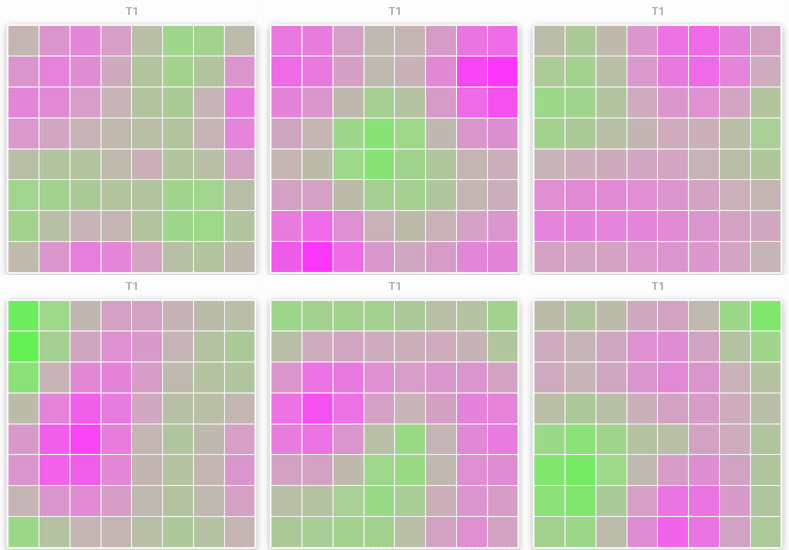
2D plasma effect — four sine waves (horizontal, vertical, diagonal, radial) create flowing interference color patterns. Matrix devices only.
from lifx.effects import EffectPlasma2D

effect = EffectPlasma2D(speed=1.0, scale=1.0, hue1=270, hue2=180)
await conductor.start(effect, [matrix_light])
Key parameters: speed (animation speed), scale (spatial scale), hue1/hue2
Device Compatibility Reference
| Effect | Light | MultiZone | Matrix |
|---|---|---|---|
| cylon | COMPATIBLE | RECOMMENDED | — |
| wave | COMPATIBLE | RECOMMENDED | — |
| sine | COMPATIBLE | RECOMMENDED | — |
| spectrum_sweep | COMPATIBLE | RECOMMENDED | — |
| spin | COMPATIBLE | RECOMMENDED | — |
| twinkle | RECOMMENDED | RECOMMENDED | COMPATIBLE |
| embers | COMPATIBLE | RECOMMENDED | — |
| plasma | COMPATIBLE | RECOMMENDED | — |
| pendulum_wave | — | RECOMMENDED | — |
| double_slit | — | RECOMMENDED | — |
| rule30 | — | RECOMMENDED | — |
| rule_trio | — | RECOMMENDED | — |
| fireworks | — | RECOMMENDED | — |
| ripple | — | RECOMMENDED | — |
| jacobs_ladder | — | RECOMMENDED | — |
| newtons_cradle | — | RECOMMENDED | — |
| sonar | — | RECOMMENDED | — |
| plasma2d | — | — | RECOMMENDED |
All ported effects run indefinitely until stopped via conductor.stop().
Firmware Move effect
Move runs on the strip's own firmware: the library sends one packet and the strip animates itself, so there is no Conductor and no Animator involved. Move rotates whichever colours are already on the strip rather than carrying a palette of its own.
set_move_effect() gives a single-colour strip something to move. When every zone shows one
colour, it generates a three-colour palette and passes it to apply_theme() before Move starts.
A strip that already shows more than one colour is left as it is. A palette= argument you
supply is passed to apply_theme() unchanged, without first reading the strip's own colours
through get_all_color_zones(). apply_theme() shuffles the palette and blends between its
colours across the zones, so the strip shows a blend of the palette rather than each colour in
the order given.
Both examples below assume a connected MultiZoneLight bound to light. The one-call typed
method builds the effect, applies the palette rule, and sends it in one step:
The builder form constructs the effect on its own and sends it through set_effect(). Unlike
set_move_effect(), this path never paints a palette:
from lifx import Direction, MultiZoneEffect

effect = MultiZoneEffect.move(Direction.FORWARD, 5.0)
await light.set_effect(effect)
Next Steps
- See Effects Gallery for animated previews of all effects
- See Effects Reference for detailed documentation on all effect parameters
- See Custom Effects to learn how to create your own effects
- See Effects Architecture to understand how the system works internally
- See Troubleshooting for common issues and solutions